Table of Content

TL;DR
1. Abstract
2. Introduction
3. High-Level System Behavior
4. Process Discovery and Cursor’s Execution Model
5. Workload Signal Extraction
6. Signal Stabilization with EMA and Timing Windows
7. State Machine Design
8. Safe Browser Automation
9. Reliability and Debugging Features
10. Results
11. Discussion
12. Limitations and Future Work
13. Conclusion
14. Mermaid Diagram Source Code
15. References
Acknowledgment
Inferring When Cursor Is Actually Working: An Automation Agent Built Without APIs
Using OS-level workload signals to open a browser while Cursor works and close only that window when it finishes
 7 min read

TL;DR
A Python automation agent monitors CPU activity across Cursor-related processes to infer when Cursor is working. The signal is smoothed and passed through a simple state machine. While Cursor works, the agent opens a new browser window to selected content. When work finishes, it closes only that window. No APIs are required.
1. Abstract
Cursor does not expose public APIs, SDKs, or internal workload events that indicate when it is actively working. This project builds a Python automation agent that treats Cursor as a closed-box application and infers its working state using OS-level signals. The agent monitors Cursor-related processes with psutil, aggregates CPU activity, smooths the signal using an Exponential Moving Average, and applies timing thresholds to classify Cursor as WORKING or IDLE. When Cursor is working, the agent opens a new browser window with selected content. When Cursor becomes idle, the agent closes only the window it created. This approach demonstrates how workload inference can enable reliable automation for tools that provide no official integration points.
2. Introduction
AI-assisted coding tools such as Cursor significantly improve developer productivity, but they also introduce waiting periods while responses are generated. Cursor does not provide a built-in indicator that clearly signals when it is actively working versus idle. This makes it difficult to automate workflows around those waiting periods.
This project approaches the problem externally. Rather than integrating with Cursor internally, the system observes how Cursor behaves at the operating system level. By monitoring resource usage across Cursor-related processes, the agent infers whether Cursor is performing sustained work. That inferred state is then used to trigger automation in a predictable and non-disruptive way.
3. High-Level System Behavior
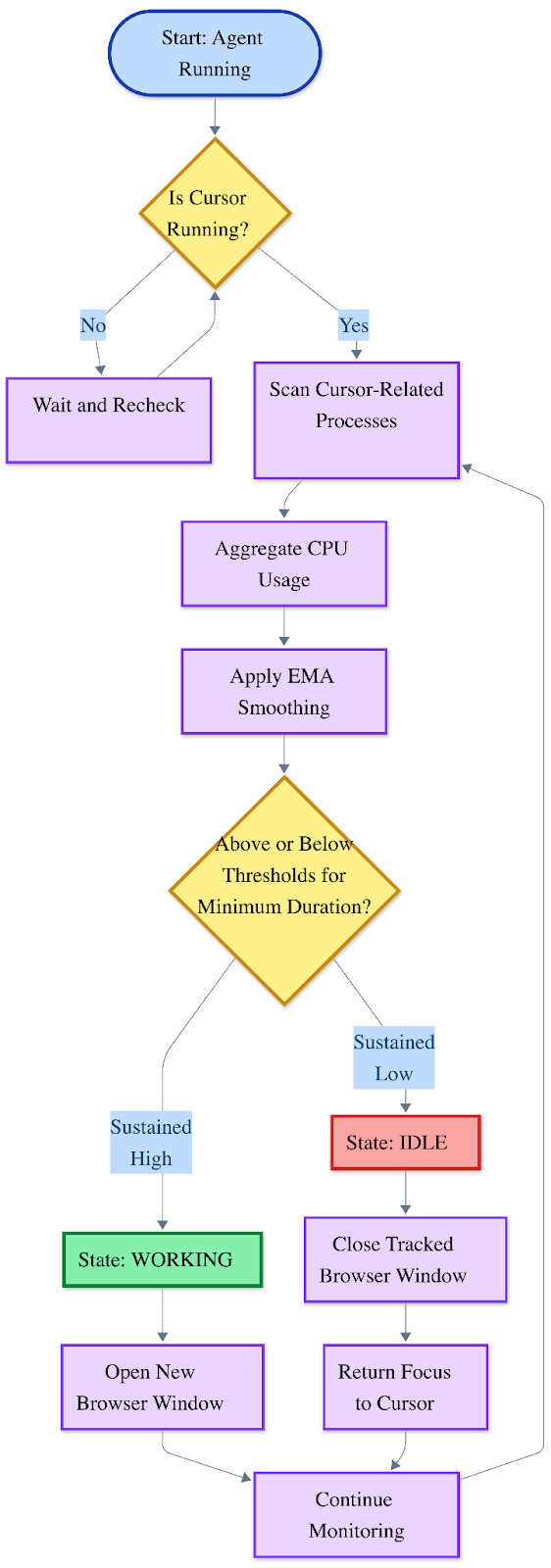
When the script runs in the terminal, it opens a new Chrome window and loads one website from a predefined list, such as YouTube or LinkedIn. Each time the agent activates, it selects the next site in that list. When Cursor finishes working, the agent closes only the Chrome window it created, leaving all other browser windows untouched.
At a high level, the agent repeatedly answers one question:
Is Cursor actually working right now?
To do that reliably, it follows this sequence:
- Detect whether Cursor-related processes are running
The system first checks whether Cursor is running at all. This matters because automation should never trigger if Cursor is closed. In practice, Cursor is an Electron app, so the agent searches for Cursor and its helper processes by name patterns rather than relying on a single PID.
- Aggregate CPU activity across those processes
Cursor’s workload is often spread across multiple subprocesses (renderers, helpers, utilities). Monitoring only the main process can miss the real computer activity. The agent therefore samples CPU usage across all Cursor-related processes and aggregates them into one workload signal.
- Smooth the signal to reduce noise
Raw CPU measurements spike and drop constantly, even when no meaningful work is happening. To avoid reacting to jitter, the agent applies Exponential Moving Average (EMA) smoothing. This produces a more stable signal that reflects sustained activity instead of momentary bursts.
- Apply timing rules to avoid false triggers
Even with smoothing, short spikes can still occur. The agent uses minimum-duration rules so the CPU signal must stay above a “busy” threshold for a set amount of time before declaring WORKING, and must stay below an “idle” threshold before returning to IDLE. This prevents rapid flickering between states.
- Transition between WORKING and IDLE states
The system is modeled as a simple state machine. Once the workload signal passes the “busy” condition, it transitions into WORKING exactly once. When the workload signal satisfies the “idle” condition, it transitions back into IDLE. This keeps behavior predictable and prevents repeated open-close loops.
- Open or close a browser window based on state changes
On a WORKING transition, the agent opens a new Chrome window and loads the next site in the rotation. On an IDLE transition, it closes only the tracked window it created (using a stored window ID on macOS or a tracked process ID on Windows). This safety rule is essential so the agent never disrupts the user’s existing browsing session.
4. Process Discovery and Cursor’s Execution Model
Cursor is built on Electron and runs as multiple cooperating processes rather than a single executable. Significant activity often occurs inside helper and renderer processes rather than the main application process.
Monitoring only the primary Cursor process proved insufficient. The agent therefore scans the system process list and identifies all Cursor-related processes using name-based matching. CPU usage is sampled across these processes and aggregated into a single workload signal. This design ensures that real activity is detected even when computation is distributed across helpers.
5. Workload Signal Extraction
The agent relies primarily on aggregated CPU usage to infer workload.
CPU is sampled continuously from all identified Cursor-related processes using psutil. The values are combined into a single metric representing overall activity. Two thresholds are used:
- A busy threshold that indicates sustained work
- A lower idle threshold that allows the system to return to IDLE quickly once work completes
Using a lower idle threshold improves responsiveness and prevents the browser from staying open longer than necessary.
6. Signal Stabilization with EMA and Timing Windows
Raw CPU measurements fluctuate constantly and are not suitable for direct state changes. To stabilize the signal, the agent applies an Exponential Moving Average. This reduces sensitivity to brief spikes while still responding to sustained activity.
In addition, timing windows are enforced. CPU activity must remain above or below the configured thresholds for a minimum duration before a state transition occurs. These timing rules prevent rapid flickering between WORKING and IDLE and ensure that automation actions feel intentional.
7. State Machine Design
The control logic is implemented as a two-state machine:
- IDLE: Cursor is considered inactive and no browser window should be open
- WORKING: Cursor is considered actively working and a browser window should be open
Transitions occur only when smoothed CPU activity satisfies both threshold and timing requirements. This design guarantees that browser actions happen once per meaningful transition rather than repeatedly.
8. Safe Browser Automation
A key requirement was ensuring that the agent never interferes with the user’s existing browser windows.
On macOS, AppleScript is used to create a new Chrome window, load a specific URL, and retrieve the window identifier. That identifier is stored and later used to close exactly the same window. On Windows, a separate browser process is launched and tracked by process ID so that only that process is terminated later.
This approach ensures that only the browser window created by the agent is affected, preserving the user’s normal browsing session.
9. Reliability and Debugging Features
Several design choices improve stability and debuggability:
- A grace period after Cursor launches to ignore startup spikes
- Verbose logging of raw and smoothed CPU values
- Clear state transition messages printed in the terminal
- Adjustable thresholds and timing parameters for tuning
These features made it possible to iteratively refine the agent’s behavior until it behaved consistently across sessions.
10. Results
After tuning, the agent reliably detected sustained Cursor activity and responded correctly:
- Browser windows opened only during genuine working periods
- Windows closed promptly once Cursor became idle
- No existing browser windows were affected
- The system behaved consistently across repeated runs
The final behavior matched the intended workflow without requiring any access to Cursor’s internal state.
11. Discussion
This project shows that meaningful automation can be built even when an application exposes no APIs or internal state. Cursor provides no direct signal for when it is actively working, yet its behavior leaves observable traces at the operating system level. By aggregating CPU usage across Cursor-related processes and stabilizing the signal with smoothing and timing rules, the agent is able to infer workload in a reliable way.
One key lesson from this work is that stability matters more than raw sensitivity. Early versions that reacted directly to CPU spikes produced inconsistent behavior. Introducing EMA smoothing and minimum-duration thresholds significantly improved predictability. Another important insight is the role of safety in UI automation. Tracking and closing only the browser window created by the agent avoids disrupting the user’s existing workflow, which is essential for real-world usability.
Although Cursor is the motivating example, the same workload-inference approach can apply to other closed-box tools where internal events are unavailable.
12. Limitations and Future Work
Because the system relies on inference rather than internal signals, thresholds may require tuning depending on machine performance and background load. Very short tasks may also be filtered out intentionally by the timing window in favor of stability.
Future work could explore combining CPU activity with additional signals, such as more detailed network patterns or lightweight visual cues, to improve accuracy. The approach could also be extended to other AI-assisted tools or integrated into larger desktop agent frameworks for more complex workflows.
13. Conclusion
This project demonstrates that reliable automation does not require APIs or privileged access. By observing Cursor as a closed-box application and inferring workload from OS-level signals, the agent detects when Cursor is actively working and triggers safe, targeted automation.
The final system combines multi-process monitoring, signal smoothing, and state-machine logic to open a browser window during work periods and close only that window when work completes. Beyond Cursor, this approach highlights a general strategy for automating modern AI tools that are not designed for direct integration.
14. Mermaid Diagram Source Code
%%{init: {
  'theme': 'base',
  'themeVariables': {
    'fontSize': '24px',
    'fontFamily': 'Arial, sans-serif',
    'lineColor': '#64748b',
    'edgeLabelBackground': '#bfdbfe',
    'tertiaryTextColor': '#0c4a6e'
  }
}}%%

flowchart TD
    Start([Start: Agent Running])
    CheckCursor{Is Cursor<br/>Running?}
    WaitRecheck[Wait and Recheck]
    ScanProcesses[Scan Cursor-Related<br/>Processes]
    AggregateCPU[Aggregate CPU Usage]
    ApplyEMA[Apply EMA Smoothing]
    CheckThreshold{Above or Below<br/>Thresholds for<br/>Minimum Duration?}
    StateWorking[State: WORKING]
    StateIdle[State: IDLE]
    CloseBrowser[Close Tracked<br/>Browser Window]
    ReturnFocus[Return Focus<br/>to Cursor]
    OpenBrowser[Open New<br/>Browser Window]
    Continue[Continue Monitoring]

    Start --> CheckCursor
    CheckCursor -->|No| WaitRecheck
    CheckCursor -->|Yes| ScanProcesses
    WaitRecheck --> CheckCursor
    ScanProcesses --> AggregateCPU
    AggregateCPU --> ApplyEMA
    ApplyEMA --> CheckThreshold
    CheckThreshold -->|Sustained<br/>High| StateWorking
    CheckThreshold -->|Sustained<br/>Low| StateIdle
    StateWorking --> OpenBrowser
    StateIdle --> CloseBrowser
    OpenBrowser --> Continue
    CloseBrowser --> ReturnFocus
    ReturnFocus --> Continue
    Continue --> ScanProcesses

    classDef startClass fill:#bfdbfe,stroke:#1e40af,stroke-width:4px,color:#000000
    classDef decisionClass fill:#fef08a,stroke:#ca8a04,stroke-width:4px,color:#000000
    classDef processClass fill:#e9d5ff,stroke:#7c3aed,stroke-width:3px,color:#000000
    classDef workingClass fill:#86efac,stroke:#15803d,stroke-width:4px,color:#000000
    classDef idleClass fill:#fca5a5,stroke:#dc2626,stroke-width:4px,color:#000000

    class Start startClass
    class CheckCursor,CheckThreshold decisionClass
    class WaitRecheck,ScanProcesses,AggregateCPU,ApplyEMA,CloseBrowser,ReturnFocus,OpenBrowser,Continue processClass
    class StateWorking workingClass
    class StateIdle idleClass

%%{
  init: {
    'themeCSS': '.edgeLabel { color: #0c4a6e !important; }'
  }
}%%
15. References
- Psutil Documentation
https://psutil.readthedocs.io - Electron Process Model
https://www.electronjs.org/docs/latest/tutorial/process-model - AppleScript Language Guide
https://developer.apple.com/library/archive/documentation/AppleScript/Conceptual/AppleScriptLangGuide - Google Chrome Automation on macOS
https://support.google.com/chrome/answer/157179
Acknowledgment
I would like to thank Prof. Rohit Aggarwal for guiding the direction of this project and helping refine its scope. Building on a prior Simular-based agent exercise and earlier automation work, he suggested focusing the agent on detecting when Cursor is actively working and using that inferred workload state to trigger browser behavior, which shaped the core problem statement and final goals. Throughout the process, he provided periodic check-ins, milestone confirmations, and approval to proceed through the staged writing workflow, and he recommended using a GEO-optimized Medium article framework for the documentation. The final implementation, including OS-level workload inference, signal stabilization, state-machine-based control, safe browser window tracking, and cross-platform support for macOS and Windows, represents the new contributions developed for this project.
Dr. Rohit Aggarwal is a professor, AI researcher and practitioner. His research focuses on two complementary themes: how AI can augment human decision-making by improving learning, skill development, and productivity, and how humans can augment AI by embedding tacit knowledge and contextual insight to make systems more transparent, explainable, and aligned with human preferences. He has done AI consulting for many startups, SMEs and public listed companies. He has helped many companies integrate AI-based workflow automations across functional units, and developed conversational AI interfaces that enable users to interact with systems through natural dialogue.